FeaturesExpressions
Expressions in EllieBot
An expression makes EllieBot answer a word or phrase with your own reply. Use them for custom commands, auto replies, or a rules link that anyone can bring up.
Add an expression
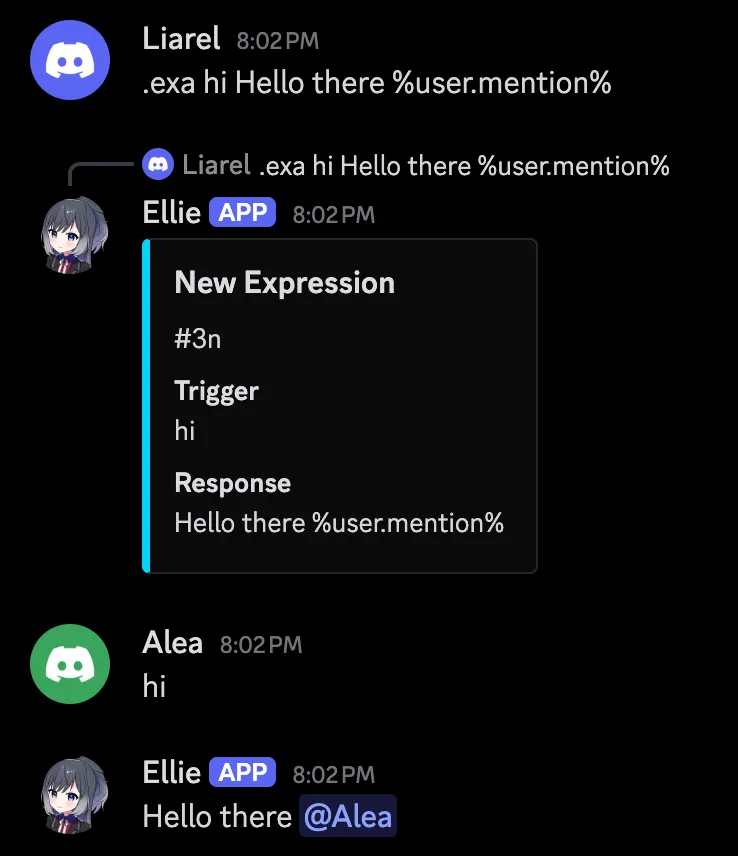
Give .expradd a trigger and a reply: .expradd "hello" Hi there %user.mention%. From then on, EllieBot sends that reply whenever someone types the trigger, in capitals or not. Put a trigger of several words in quotes.
The reply can be plain text, or an embed made in the embed builder, whose Expression tab writes the whole command for you. Placeholders work in both.
Each expression gets a short ID, which the other commands use. .exprlist shows them.
.expradd- Add a trigger and the reply EllieBot sends to it.
.expredit- Change an expression's reply.
.exprdel- Delete an expression.
.exprlist- List this server's expressions.
.exprsearch- Search expressions by trigger or reply.
.exprprint- Show an expression's reply.
Choose when it triggers
By default the whole message has to be the trigger. .exprat lets a message carry on after the trigger, and .exprca makes it work anywhere in a message, as a whole word.
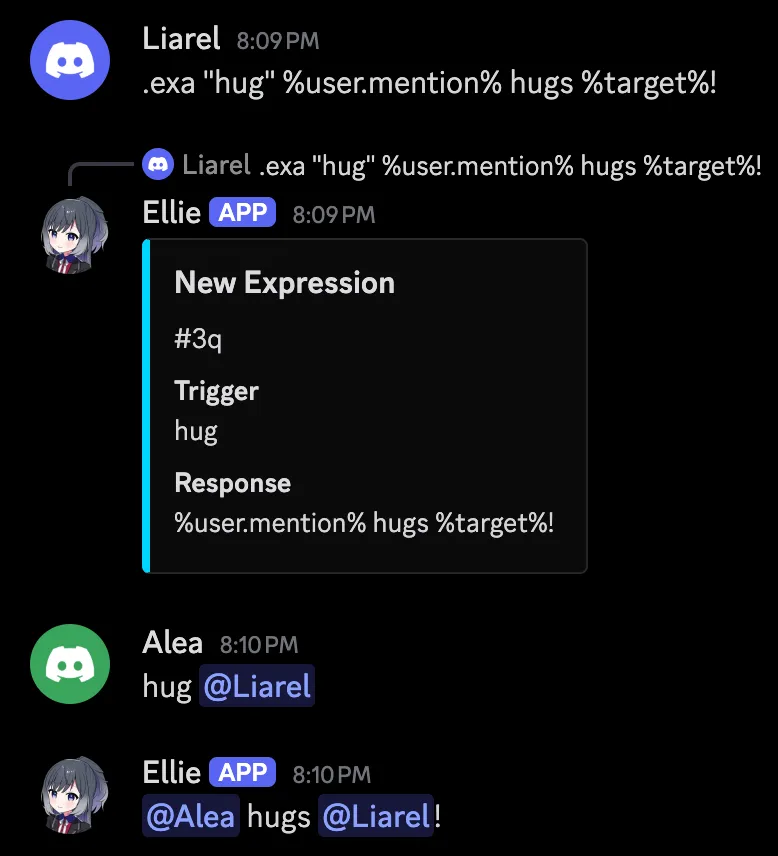
Put %target% in the reply to use the text typed after the trigger, so .expradd "hug" %user.mention% hugs %target%! works with hug @someone. An expression with %target% allows that extra text on its own.
A trigger can also start with %bot.mention%, for a reply when someone mentions EllieBot.
Random replies, reactions and DMs
Add several expressions with the same trigger and EllieBot picks one at random each time. Turn on .exproverride if you would rather have a new expression replace the old one with that trigger.
.exreact adds up to 3 reactions to the reply, .exprdm sends the reply by DM, and .exprad deletes the member's message that set it off.
A reply of just - sends nothing and stops the trigger's other replies. With .exreact, EllieBot reacts to the member's own message instead.
.exreact- Set up to 3 reactions on the reply.
.exprdm- Send the reply by DM, or back in the channel.
.exprad- Delete the message that set it off, or keep it.
.exproverride- Make a new expression replace the old one with that trigger.
Back up or move your expressions
.exexport saves your server's expressions to a file, and .eximport loads a file into a server, up to 1,000 expressions at a time.
Global expressions are set by the bot's owner and work everywhere. Your server's own expressions come first, and .exprtoggleglobal turns the global ones off for your server.
.exexport- Save this server's expressions to a file.
.eximport- Load expressions from a file.
.exprtoggleglobal- Turn global expressions on or off for this server.
.exprclear- Delete every expression on this server.
Set it up in 3 steps
Adding, changing and deleting expressions needs the Administrator permission.
- Invite EllieBot, then add your first expression:
.expradd "hello" Hi there %user.mention% - Type the trigger in any channel:
hello - Make it work anywhere in a message, using the ID EllieBot gave you:
.exprca 5c
Questions about expressions
Can an expression pick a random reply?
Yes - add several expressions with the same trigger, and EllieBot picks one of them each time someone types it.
How do I make a trigger with more than one word?
Put it in quotes: .exa "hi there" Hello there %user.mention%.
Can I change an expression's trigger?
No - add a new expression with the new trigger, then delete the old one with .exd and its ID.
Why doesn't my expression answer when the word is in a sentence?
By default the message must be the trigger and nothing else. Turn on contains anywhere with .exca and the expression's ID.
How do I stop expressions from triggering on my server?
Turn off the module that runs them: .sm ActualExpressions disable.
What happened to custom reactions?
They are expressions now. The old commands still work: .acr adds one, .lcr lists them and .dcr deletes one.